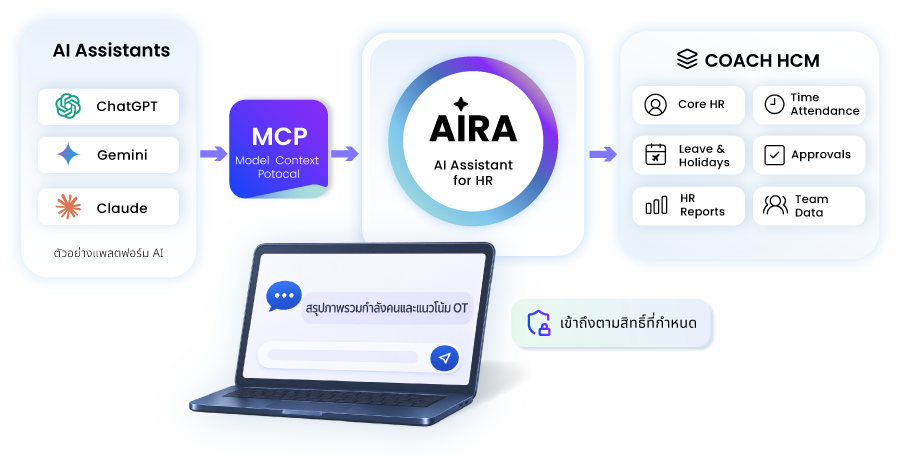
MCP Integration connects compatible AI apps to COACH HCM’s HR data and functions through AIRA. Available actions depend on supported functions, system configuration, and the permissions defined by your organization.
From everyday HR questions to relevant data summaries, define who can access which information and which functions they can use.
Availability depends on the connection method, enabled tools, and user permissions.
What Is AIRA with MCP, and How Does It Connect to COACH HCM?
AIRA with MCP provides a way for compatible AI apps to access COACH HCM’s HR data and functions through AIRA. What users can access or do depends on the capabilities made available and their permissions.
AI Client
An AI app for questions and requests via supported connections.
MCP
An open standard connecting AI apps to external tools and data.
AIRA
An AI assistant for HR, using natural language to access data and supported functions.
COACH HCM
A Human Capital Management system for HR data and processes.
The conceptual flow is: AI Client → MCP → AIRA → COACH HCM
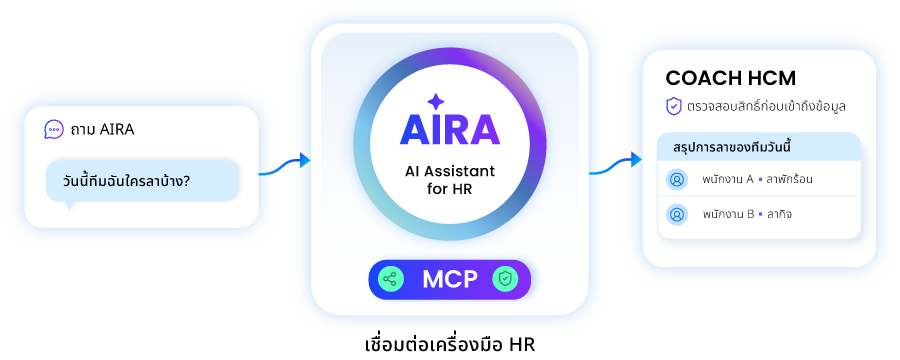
Users submit requests through a connected AI client. The system checks identity, permissions, and data scope before calling supported tools and returning results.
Changes to data or transaction status follow the organization’s confirmation and approval steps.
Start with the tasks each user needs to complete, then define the data, tools, and permissions required for their role.
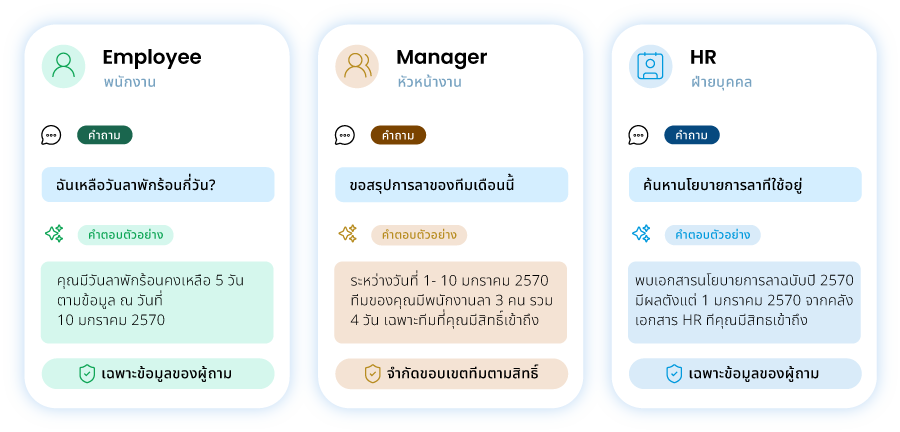
Employee
Personal Data
View your data and take permitted actions.
Manager
Authorized Team Data
View team data, summaries, and progress.
HR
Policies & Reports
Access HR policies, data, and reports.
HR Administrator
Access & Connections
Manage permissions and MCP connections.
Which HR Data and Functions Can Connect through MCP?
AIRA with MCP connects AI to COACH HCM’s HR data and functions. Access and actions depend on supported modules, system configuration, and the permissions defined by your organization.
Core HR
Employee and organizational information.
Time Attendance
Working time and attendance information.
Leave & Holidays
Leave and holiday information.
Approvals
Supported approval records and actions.
HR Reports
HR reports and summary information.
Team Data
Team information within the authorized scope.
Read — Retrieve, Search, and Summarize Information
Retrieve, search, or summarize information from available data sources within the time period and data scope the user is authorized to access.
Write / Action — Create or Process Transactions
Create requests, update data, or change status where supported and permitted by the workflow. Read access does not grant edit or approval rights.
AIRA Guardrails: Govern HR AI Use with Organizational Policies
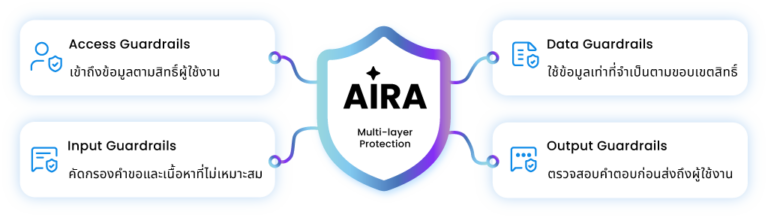
AIRA Guardrails help guide AI behavior and responses within your organization’s context. They define response roles and permitted topics, screen inappropriate requests or attempts to bypass rules, limit data use to what is necessary, and check responses before they reach users. These controls work alongside the permissions and policies defined by your organization.
The following scenarios use fictional data to illustrate how questions, information, and permissions work together. Actual use requires supported tools and available data sources.
“Only the requester’s data is shown after identity and permission checks. Available actions depend on supported functions.”
Trusted by Leading Organizations
Plan AI Integration for Your Organization’s HR Workflows
Talk to the COACH HCM team about your use cases, supported data and functions, and an access approach that fits your organization.
AIRA is an AI assistant for HR within the COACH HCM ecosystem. MCP is an open standard for connecting AI apps to external tools and data. They work together to enable connectivity, but serve different roles.
Which Organizations Is AIRA with MCP Suitable For?
It is suitable for organizations that want to use AI apps with HR data and processes, and can define access permissions, data sources, and responsibility for managing the connection.
Do All Users Have the Same Access to HR Data?
No. Access depends on the user’s account, role, permissions, and organizational settings. For example, employees may access their own information, while managers may access team information within their authorized scope.
Can AI Immediately Approve Transactions or Edit Information?
Only when a supported tool is available, the user has permission, and the required system conditions are met, including any relevant confirmation or approval steps. Being able to ask AI about information does not automatically mean the user can edit it.
Which ChatGPT, Gemini, or Claude Plan Is Required?
Check the latest requirements for the interface you intend to use, including account permissions and workspace policies. Compatibility with AIRA must also be tested before selecting the appropriate setup.