
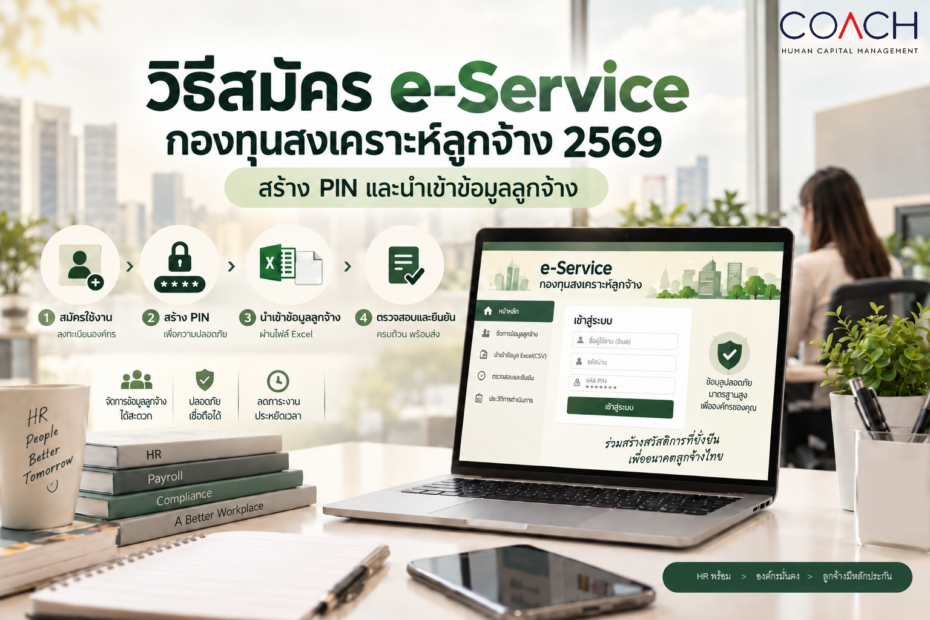
The Employee Welfare Fund (EWF) is becoming an important compliance matter for HR teams, Payroll teams, and employers in Thailand.
The Department of Labour Protection and Welfare has announced that the Employee Welfare Fund e-Service will allow employers to prepare employee information and complete registration in advance from September 15, 2026, before employee contributions and employer contributions begin on October 1, 2026.
For employers that fall within the scope of the Employee Welfare Fund requirements, preparation involves more than configuring Payroll to calculate employee and employer contributions.
Organizations also need to register for the e-Service of the Department of Labour Protection and Welfare, create a PIN for EWF transactions, prepare employee information, and upload the required employee data into the system.
The Department of Labour Protection and Welfare outlines four main steps for employers:
- Register for the e-Service.
- Set up a PIN Code.
- Submit the employee list to register eligible employees as fund members.
- Print the official registration certificate.
This article focuses on the first three key areas that employers and HR teams should complete in preparation for EWF implementation: e-Service registration, PIN creation and management, and employee data preparation and upload.
1.How to Register for the Department of Labour Protection and Welfare e-Service
To access the Employee Welfare Fund e-Service, an employer must first have an active e-Service account with the Department of Labour Protection and Welfare.
Organizations that have never used the e-Service should complete the registration process before proceeding with EWF-related activities.
However, if the company has previously used the Department’s e-Service for other labour-related services or regulatory submissions, it is advisable to check whether an existing account is already registered before creating a new one.
This helps prevent duplicate registrations and avoids potential access issues later.
Check Whether Your Company Already Has an e-Service Account
Employers should first check whether their juristic person registration number has already been registered in the e-Service system.
If an existing registration is found, the system will display the relevant registration information.
If no existing registration is found, the company can proceed with a new registration.
This step is particularly important for organizations that have previously used government e-Services but have since changed their HR, Payroll, or administrative personnel.
Information Required for Employer Registration
The registration process generally requires two main categories of information:
Establishment information and registrant information.
The establishment information that should be prepared includes:
- Company or establishment name
- Registered address
- Province
- District
- Subdistrict
- Company email address
- Office type
- Juristic person registration number
Organizations should ensure that the information entered matches their official company records.
Make Sure the Head Office and Branch Information Is Correct
One area that HR teams should pay particular attention to is the office type.
If the juristic person operates only one office, the establishment should generally be registered as the Head Office.
If the organization operates multiple branches or workplaces, the system provides relevant office or branch categories. In some cases, branch information may also require an additional branch number or sequence associated with the company’s juristic person registration.
Organizations with multiple locations should therefore review their establishment structure before completing the registration.
Accurate information at this stage can help reduce problems when employee information is subsequently registered under the EWF system.
Prepare the Registrant’s Information
The next section requires information about the person completing the registration.
Typical information includes:
- Full name
- National identification number
- Telephone number
- Email address
The e-Service password must also meet the conditions specified by the system.
According to the registration requirements, the password should contain a combination of letters and numbers and consist of at least eight characters.
The registrant must then confirm the password and complete the system’s verification process before saving the registration.
Once registration has been completed successfully, the organization can use its Username and Password to log in to the e-Service and access services relating to the Employee Welfare Fund.
Establish Clear Account Ownership
Although creating an e-Service account is relatively straightforward, organizations should clearly define who will be responsible for managing the account.
The responsible person may be part of:
- HR
- Payroll
- Finance or Administration
- Another authorized function
An organization should avoid relying on one employee without establishing an internal handover or account management process.
If that employee transfers to another position or leaves the organization, access to the e-Service could become an operational issue during important registration or submission periods.
In other words, e-Service registration should not be viewed simply as creating a Username and Password.
It should form part of the organization’s Payroll governance, compliance, and access control process.
2. Creating and Managing the PIN for the Employee Welfare Fund
After successfully accessing the e-Service, the next step is to create a PIN Code for the Employee Welfare Fund.
An important point for employers to understand is that the EWF PIN is separate from the Username and Password used to log in to the e-Service.
The Department of Labour Protection and Welfare defines PIN setup as a separate step after e-Service registration and before submitting employee information for fund registration.
Therefore, being able to log in to the e-Service does not mean that the organization’s EWF setup is complete.
What Is the Role of the EWF PIN?
From an operational perspective, the PIN is part of the authorization process for transactions performed through the Employee Welfare Fund system.
The overall process can be summarized as follows:
e-Service Account → EWF → PIN → Employee Data → Registration
Understanding this sequence is important.
An organization may already have a complete Excel file containing employee information. However, if the e-Service account or PIN has not been properly set up, the organization may still encounter delays when it is time to register employees.
Who Should Be Responsible for the PIN?
The organization should assign responsibility for the PIN to the person or function responsible for EWF administration.
This may include HR, Payroll, or another person formally authorized to act on behalf of the employer.
Organizations using an outsourced Payroll service should also clearly define responsibilities between the employer and the Payroll service provider.
For example:
The employer may retain responsibility for the e-Service account, system access, and PIN management, while the Payroll service provider may prepare employee data or submission files.
Defining these responsibilities in advance can reduce confusion when the actual registration and contribution process begins.
Do Not Share the PIN Through Uncontrolled Channels
From an internal control perspective, organizations should treat the EWF PIN as access-related information.
It should not be distributed through general chat groups, shared documents, or other communication channels that can be accessed by unauthorized personnel.
Organizations should define:
- Who is authorized to access the PIN
- How the PIN is stored
- How responsibility is transferred when personnel change
- How access is reviewed when roles or responsibilities change
These controls can help reduce unnecessary access and operational risk.
How Are Username, Password, and PIN Different?
| Item | Primary Purpose | Key Consideration |
|---|---|---|
| Username | Identifies the user account for accessing the e-Service | Assign a clear account owner and avoid unnecessary duplicate accounts |
| Password | Authenticates the user when logging in to the e-Service | Store securely and manage according to the organization’s security policy |
| PIN | Used as part of the EWFund process according to the procedures defined by the Department | Restrict access and avoid sharing it through public or uncontrolled channels |
The Username and Password are used to log in to the Department of Labour Protection and Welfare e-Service.
The PIN Code, on the other hand, is an additional step specifically associated with the Employee Welfare Fund process.
Organizations therefore need both an active e-Service account and a properly configured PIN before proceeding with the next stages of EWF administration.
The Department has also published separate user guides for “Registration and Login,” “PIN Creation and Management,” and “Employee Data Import,” which confirms that these activities are separate steps in the overall process.
3. Importing Employee Data into the EWF System
Once the e-Service registration and PIN setup have been completed, the next major task for HR is preparing and importing employee data.
The Department of Labour Protection and Welfare has announced that employers can begin importing employee lists from September 15, 2026.
An official EWF Excel Template and related instructions are also available for preparing employee data before importing it into the system.
Before Preparing the Excel File, Determine Which Employees Need to Be Registered
HR should not simply export the entire Employee Master from the HR or Payroll system and upload it directly into EWF.
The first step should be to determine which employees fall within the scope of the Employee Welfare Fund requirements.
The fund applies to establishments and employees that fall within the scope defined by law.
Employers should therefore review the relevant requirements and exemptions, including each employee’s Provident Fund (PVD) status where applicable.
A recommended workflow is:
Employee Master → Review Employment Status → Check PVD Status / Applicable Exemptions → Identify Employees within EWF Scope → Prepare Excel File → Validate → Upload
Performing this Employee Eligibility Review before creating the upload file can help reduce both incorrect registrations and the risk of excluding employees who should be registered.
Use the Official Excel Template
Employers should use the latest Excel Template provided by the Department of Labour Protection and Welfare.
Creating a new spreadsheet independently is not recommended.
Even if the data itself is correct, changes to column structure, data format, or required fields may cause the import process to fail.
The safest approach is therefore to download the latest official template before preparing each submission.
Review the Employee Master Before Importing Data
For organizations with a large workforce, data cleansing is an important part of the preparation process.
Before employee information is imported, HR should ensure that relevant employee records are accurate and up to date.
This may include reviewing:
- Employee identification information
- Employment information
- Current employment status
- Other information required by the official Template
The e-Service contains information used for labour law compliance and identity verification. Data accuracy and appropriate handling of personal information should therefore be treated as important controls.
Validate the Data Before Upload
Before uploading the file, HR should perform a final validation of the employee information.
Key items to review include:
- Employees who fall within the scope of the fund
- Duplicate employee records
- Mandatory fields that are incomplete
- Data formats that do not match the Template
- Employees who have already resigned or whose employment status has changed
- Employees whose PVD status has changed
- The number of employees in the file compared with the HR-approved employee list
For organizations with a large number of employees, it may also be useful to perform a reconciliation between the Employee Master, the EWF upload file, and the final upload result.
Upload the Employee Data and Check the Result
Once the employee information has been prepared and validated, the organization can log in to the EWF system and upload the employee list according to the required process.
However, the process should not be considered complete immediately after uploading the file.
HR should review the import result and employee status to confirm that all required records were successfully accepted and identify any records that need to be corrected.
Retain Uploaded Files for Audit and Future Reference
Organizations should retain each uploaded file together with the date of submission.
Supporting evidence or reports showing the import result should also be retained where appropriate.
This makes it easier for HR and Payroll to verify:
- Which employees were included in each submission
- New hires
- Employee resignations
- Changes in employee status
- Corrections made in subsequent periods
Maintaining proper records also supports internal reviews and future audits.
Timeline HR and Payroll Should Know
| Date | What Happens | What the Organization Should Do |
|---|---|---|
| September 15, 2026 | The system opens for importing employee lists | Prepare the e-Service Account, PIN, Template, and employee information |
| October 1, 2026 | Employee and employer contributions begin according to the applicable requirements | Review Payroll configuration and relevant wage information |
| From November 1, 2026 onward | Employers can report fund contributions through the system | Prepare contribution data and reconcile the amount with Payroll |
HR and Payroll teams should therefore not wait until the first contribution calculation date before registering for the system.
The Account, PIN, and Employee Data should be prepared in advance.
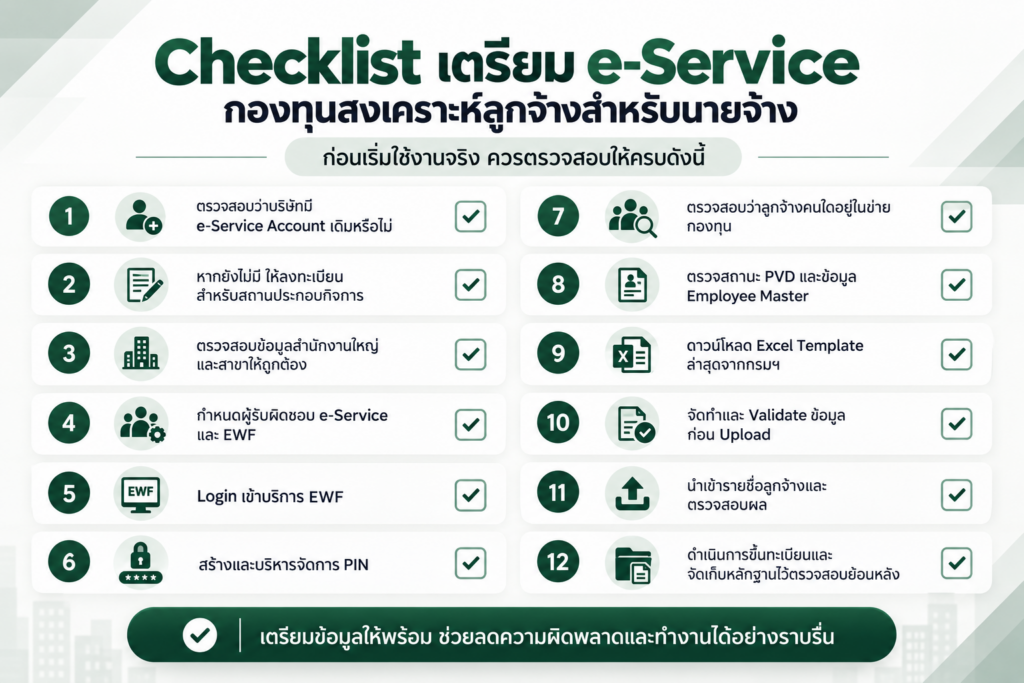
Employer Checklist for the Employee Welfare Fund e-Service
Before going live, employers should confirm that all of the following have been completed:
- Check whether the company already has an existing e-Service Account.
- If not, register the establishment for the e-Service.
- Verify that Head Office and branch information is correct.
- Assign an owner for the e-Service and EWF process.
- Log in to the EWF service.
- Create and manage the PIN.
- Identify which employees fall within the scope of the fund.
- Review PVD status and Employee Master data.
- Download the latest Excel Template from the Department.
- Prepare and validate the data before uploading.
- Import the employee list and review the upload result.
- Complete the employee registration process and retain supporting records for future reference.
FAQ: Employee Welfare Fund e-Service
When will the Employee Welfare Fund e-Service be available?
The Department of Labour Protection and Welfare has announced that employers can begin importing employee lists from September 15, 2026.
When will Employee Welfare Fund contributions begin?
Employee and employer contributions are scheduled to begin on October 1, 2026. Based on the current government information referenced in this article, the initial contribution rate is 0.25% of wages for the employee and 0.25% for the employer, subject to the applicable requirements.
Is the EWF PIN the same as the e-Service Password?
No. The Department separates e-Service registration from PIN setup. The PIN must be configured as part of the EWF process before proceeding with employee registration.
Can an employer upload all employees directly into EWF?
Employers should first determine which employees fall within the scope of the fund, including reviewing PVD status and other relevant conditions, before preparing the employee list using the official Template.
Conclusion: HR Should Start with e-Service Before Moving to Payroll Processing
Preparing for the Employee Welfare Fund in 2026 should not begin only when Payroll is calculated.
The process should start earlier with system access, employee data, and registration readiness.
The recommended sequence is:
Register / Check e-Service → Create PIN → Identify Employees within Scope → Prepare Excel Template → Upload Data → Complete Registration → Prepare Payroll and Contribution Submission
Organizations that prepare their Account, Employee Master, and Payroll processes in advance can reduce the risk of inaccurate employee data, delayed registration, and last-minute corrections when EWF requirements go live.
For organizations with a large workforce, maintaining accurate employee information within an integrated HR and Payroll system can also make it easier to identify eligible employees, prepare submission data, and respond efficiently to new regulatory requirements.
Official References
Department of Labour Protection and Welfare e-Service
https://eservice.labour.go.th/
EWF User Guides and Information
https://itserver15.labour.go.th/ewfundTemplate/ewfund-media.php
Employee Data Excel Template
Available through the Department of Labour Protection and Welfare EWF portal.